
7 Tips for Choosing a Modular Desk Office

Choosing a Modular Desk Office is no longer only a furniture decision. It affects focus, collaboration, comfort, and how efficiently a workplace can change.

Steelcase’s 2023 Global Report found that 87% of surveyed employees had some choice over where and when they worked. Its findings also showed that workers wanted offices supporting both concentration and connection. Gensler’s 2024 Global Workplace Survey similarly emphasized that workplace performance depends on effective choices, not simply attractive interiors. These reports suggest a practical lesson: fixed desks may not suit every team, schedule, or growth plan.

“The office is a tool, not a destination,” said Jim Keane, former Steelcase president and CEO. That idea gives modular planning a useful direction. A well-designed Modular Desk Office can create quiet zones, shared project areas, and adjustable workstations without requiring a complete renovation. However, flexibility alone does not guarantee productivity. Poor cable management, weak acoustics, or uncomfortable desk heights can quickly undermine the design.

The following seven tips examine real decisions, including layout, materials, storage, ergonomics, privacy, technology, and future expansion. Measure first. Ask employees how they actually work, not how management assumes they work. A beautiful desk system can still fail. That is the uncomfortable part.

The recommendations also recognize budget limits and imperfect workplaces. Not every company needs premium finishes or advanced height-adjustable systems. The strongest choice may be simpler, easier to repair, and better matched to daily use. A Modular Desk Office should support people today while remaining adaptable tomorrow.
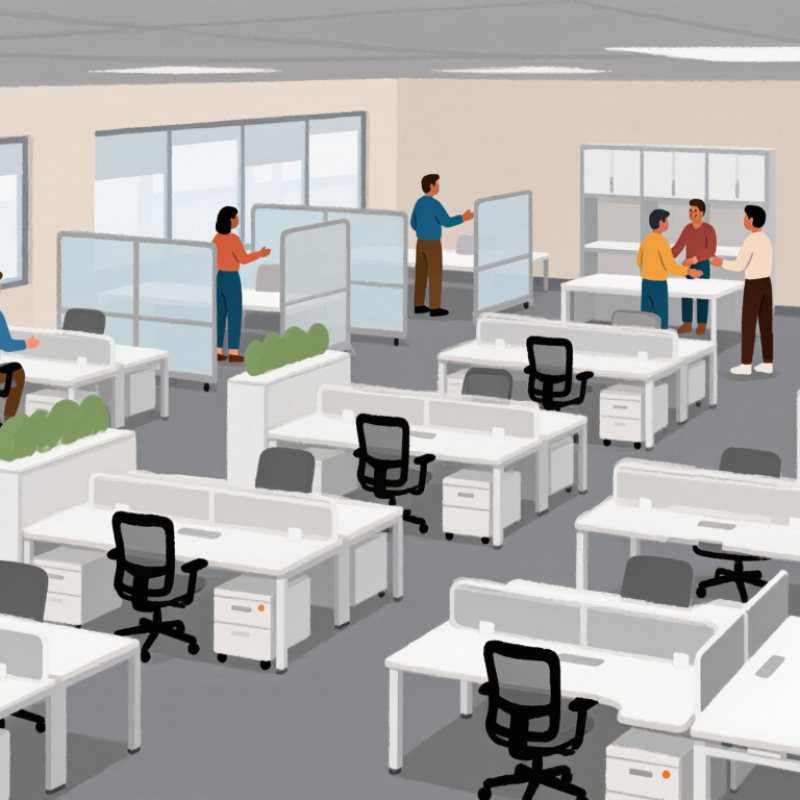
7 Tips for Choosing a Modular Desk Office

Define Your Workspace Needs and Daily Work Habits

7 Tips for Choosing a Modular Desk Office

Define Your Workspace Needs and Daily Work Habits

Choosing a modular desk office starts with your actual workday, not a showroom photo. Track three days: screen hours, video calls, handwriting, and storage needs. The 2024 American Time Use Survey from the U.S. Bureau of Labor Statistics shows employed adults worked about 7.9 hours on workdays. That duration makes reach, posture, and movement practical design issues. Measure before buying. Note whether your dominant hand needs clear space, or whether a second monitor blocks a window.

Choose modules around repeated actions. A video-heavy worker may need a quiet corner, raised monitor, and accessible cable channel. A designer may need deeper surface area and flat document space. Frequent task-switchers benefit from a sit-stand frame, movable drawer, and open legroom. Keep daily tools within relaxed reach. Store rarely used items below or behind the chair. Do not guess. Sit at the proposed height for ten minutes, then test typing, writing, and turning.

The 2024 State of the Global Workplace report says only 23% of employees are engaged worldwide. A desk cannot repair unclear priorities or exhausting routines, but friction matters. Leave room for movement, not just equipment. My planning bias is real: I often overestimate storage and underestimate cable clutter. A modular system should allow correction through removable shelves, adjustable height, and replaceable panels. Check load ratings, stability, and adjustment ranges in technical documents. A polished layout may still fail if the chair cannot pull close or daylight creates screen glare.

Measure the Room and Plan an Efficient Desk Layout

7 Tips for Choosing a Modular Desk Office

Measure the room before choosing any modular desk pieces. Record wall lengths, ceiling height, windows, outlets, and door swings. I also mark the floor with painter’s tape to test the proposed footprint. Keep at least 90 centimeters for a comfortable walkway. Leave room. A desk may fit on paper but block a drawer in practice. A scale drawing can expose these conflicts before delivery.

Place the desk near natural light, but avoid direct glare on the monitor. Keep the screen about an arm’s length from your face. Reserve a clear zone for writing, charging, and daily tools. Cable paths should stay close to wall edges and remain easy to reach. Consider adjustable modules when two people share the office. Their different heights can make a fixed surface uncomfortable. Test it. Sit down and check your knees, elbows, and viewing angle.

Think about future changes, not just today’s setup. A modular layout should allow another work surface, storage unit, or meeting chair. Measure the open space after each addition. I once planned a compact corner perfectly, then discovered the chair could not move back far enough. That mistake changed my approach. Now I leave roughly 60 centimeters behind the chair and check movement from several angles. A clean-looking layout is not always an efficient one. Photograph the taped arrangement at different times of day, because sunlight and shadows can alter how the room feels.

7 Tips for Choosing a Modular Desk Office: Measure the Room and Plan an Efficient Desk Layout

Recommended planning dimensions for creating a comfortable, accessible, and efficient modular desk office.

Use these measurements as practical planning targets: allow enough desk depth for equipment, maintain a comfortable monitor viewing distance, and preserve clear space behind the chair and along walkways. Always confirm local accessibility and building requirements before installation.

Compare Modular Materials, Configurations, and Adjustability

Choosing a modular desk office starts with materials. Tip one: compare laminate, veneer, steel, and recycled composites by scratch resistance, moisture tolerance, and repair options. Tip two: inspect the joints underneath. Loose connectors create wobble long before the desktop looks worn. Choose replaceable parts. BIFMA’s sustainability guidance emphasizes durability, material transparency, and responsible end-of-life handling. Do not judge by appearance alone.

Tip three: match the configuration to real work patterns. A straight desk suits focused tasks, while L-shaped modules separate calls from paperwork. The 2023 American Time Use Survey reports that 22.6% of employed people worked at home on days worked. Therefore, a home office may need storage, video-call space, and quick reconfiguration. Tip four: check cable channels, power access, and legroom before buying. Measure twice. I still overbuy accessories sometimes.

Tip five: prioritize height adjustability, with controls that are easy to reach and remember. Tip six: test sitting and standing positions with your monitor, keyboard, and chair already placed. Your elbows should stay relaxed, and the screen should avoid forcing your neck downward. Tip seven: leave clearance for movement and future modules. WFH Research data from 2024 shows remote work remains common, but schedules vary widely across workers. A fixed layout can age badly. Ask for load ratings, adjustment ranges, warranty terms, and replacement-part availability. If possible, test the desk for one full work session, not five minutes.

7 Tips for Choosing a Modular Desk Office - Compare Modular Materials, Configurations, and Adjustability

Tip Decision Area Options to Compare Typical Specifications or Performance Best Use Case Selection Check
1 Choose the work-surface material Laminate: scratch- and stain-resistant decorative surface
Solid wood: repairable and naturally varied
Wood veneer: real-wood appearance over a stable panel
Compact laminate: thin, dense, and moisture-resistant
Common desktop thicknesses are approximately 18–25 mm. Laminate and compact laminate are generally easy to clean, while solid wood may require periodic oiling or sealing. Veneer offers a wood appearance with less material movement than a thick solid-wood top. Laminate for high-use offices; solid wood for hospitality or executive settings; compact laminate for areas exposed to frequent spills.
2 Match the configuration to the team Single desk, back-to-back benching, L-shaped workstation, linear run, or collaborative table. A typical single workstation is about 1200–1600 mm wide and 600–800 mm deep. Back-to-back layouts can improve space efficiency, while L-shaped configurations provide separate zones for focused work and equipment. Single desks for assigned users; benching for dense teams; L-shaped layouts for multitasking; collaborative tables for meetings and shared work. Measure room dimensions, circulation routes, door swings, and access to power before selecting a layout.
3 Evaluate height adjustability Fixed height, manual sit-stand, electric sit-stand, or height-adjustable keyboard platform. Standard seated desk height is commonly around 710–750 mm. Sit-stand desks often provide a working range of approximately 650–1250 mm, depending on the frame and desktop thickness. Fixed desks for stable, budget-conscious installations; sit-stand desks for users who alternate between sitting and standing.
4 Check structural capacity Two-leg frame, four-leg frame, shared beam, reinforced pedestal, or modular panel-supported base. Many office desks are designed for distributed loads of roughly 60–120 kg, but capacity varies by frame, span, and installation. Longer surfaces generally need a center support or reinforced beam to limit deflection. Two-leg frames suit individual desks; shared beams and additional supports suit long benching runs or equipment-heavy workstations. Review the stated load rating and distinguish evenly distributed load from a concentrated load.
5 Plan cable and power management Cable tray, modesty panel, under-desk basket, desktop grommet, power module, and vertical cable spine. A practical cable route should allow power and data cables to bend without strain. Desktop grommets commonly measure approximately 60–80 mm in diameter, while sit-stand systems need flexible cable loops and sufficient slack. Cable trays for general office use; power modules for shared tables; vertical spines for open-plan or height-adjustable workstations. Keep cables clear of moving columns, provide access for maintenance, and separate power from data where required by local practice.
6 Compare modular expansion options Add-on return, screen, pedestal, CPU holder, monitor arm, storage tower, linking beam, or additional workstation module. Modular systems are most useful when components use repeatable widths, shared connection points, and replaceable panels or tops. Common expansion increments include 600–1600 mm, depending on the system design. Growing teams, leased offices, hot-desking areas, and workplaces that may need frequent reconfiguration.
7 Assess ergonomics, safety, and maintenance Rounded edges, stable leveling feet, anti-collision sensing, lockable casters, replaceable parts, and cleanable surfaces. A comfortable workstation should provide adequate leg clearance, a stable monitor position, and enough depth for the screen to sit about 500–750 mm from the user in many office setups. Adjustable feet commonly compensate for uneven floors by several millimeters. All office environments, especially shared workspaces, facilities with uneven floors, and installations requiring regular cleaning or relocation. Test stability at both sitting and standing heights, inspect pinch points, and verify that replacement components remain available.

Note: Dimensions and load ranges are typical planning values for office furniture. Always confirm the final specifications, safety requirements, and installation instructions for the selected modular system.

Evaluate Storage, Cable Management, and Future Expansion

7 Tips for Choosing a Modular Desk Office
Evaluate Storage, Cable Management, and Future Expansion

A modular desk should earn its footprint through storage, clean wiring, and adaptable parts. Measure the equipment you actually use, not the equipment you hope to buy. A laptop, two notebooks, and a document tray need different depths. Check drawer clearance with your chair pulled in. Small detail, large effect. Choose a mix of open shelves and closed compartments. Open shelves keep daily tools visible, while doors reduce visual clutter. Keep heavy files low to improve stability.

Cable management deserves a hands-on inspection. Run every cable from its device to the outlet before finalizing the layout. Look for rear channels, removable covers, and a desktop grommet near the monitor. A channel that is too narrow creates sharp bends and trapped dust. That problem appears later. Separate power cables from signal cables where practical, and leave slack for cleaning. Use labeled clips rather than forcing several cords through one opening. I once underestimated charger length; the outlet was nearby, yet the setup felt awkward.

Future expansion should be evaluated as a system, not a promise. Confirm that added shelves, a return surface, or a monitor arm can attach without blocking legroom. Check load ratings and connection hardware in the technical documentation. Compatibility may change across product revisions. Leave one accessible power socket and some unused cable capacity. Leave room to adapt. If your needs are uncertain, choose reversible components instead of permanent drilling. The most useful configuration is one you can revise without replacing the whole desk.

Check Quality, Assembly Requirements, and Overall Value

7 Tips for Choosing a Modular Desk Office

Check Quality, Assembly Requirements, and Overall Value

A modular desk office should feel stable before it looks impressive. I check the frame, joints, surface edges, and cable openings closely. A slight wobble often signals weak connections or uneven flooring. Solid panels should resist bending under ordinary office equipment. Smooth drawer movement also reveals careful manufacturing.

Assembly requirements deserve equal attention. Measure the room, doorway, and elevator before ordering large modules. Read the instructions and count every connector, screw, and support piece. Some systems need two people, special tools, or several hours. I once underestimated the lifting space and scratched a wall. That mistake still influences my planning. Clear diagrams help, but vague instructions should raise concerns.

Overall value means more than the purchase price. Compare the desk’s materials, warranty terms, repair options, and expected lifespan. A cheaper surface may swell near a drink spill or chip around the edges. Check whether replacement parts remain available after installation. Modular designs can reduce future costs when one section needs changing. However, extra shelves and accessories can quietly inflate the budget. Keep a written list of necessary features. Leave room for disappointment. Real offices become cluttered, and perfect layouts rarely stay perfect. A quality desk should handle daily adjustments without loosening, staining, or feeling temporary.

Filter By